TeamSparks
A messaging and video-call collaboration platform, similar to Discord or Slack.
此頁面尚未翻譯成中文,目前顯示英文版本。
TeamSparks lets teams create workspaces, manage channels, and connect members through messaging and video calls — a smaller-scale take on Discord/Slack. I built it solo in 5 weeks during AppWorks School to get hands-on with real-time protocols (WebRTC, WebSocket) and multi-instance backend design, not just CRUD APIs.
Stack
- Backend: Java, Spring Boot, Maven
- Frontend: HTML, CSS, JavaScript, jQuery, Bootstrap
- Real-time: WebRTC, Socket.IO, WebSocket, Coturn (TURN server)
- Data: Elasticsearch (Docker), Redis (ElastiCache)
- Infra: AWS EC2, ALB, GitHub Actions
Architecture
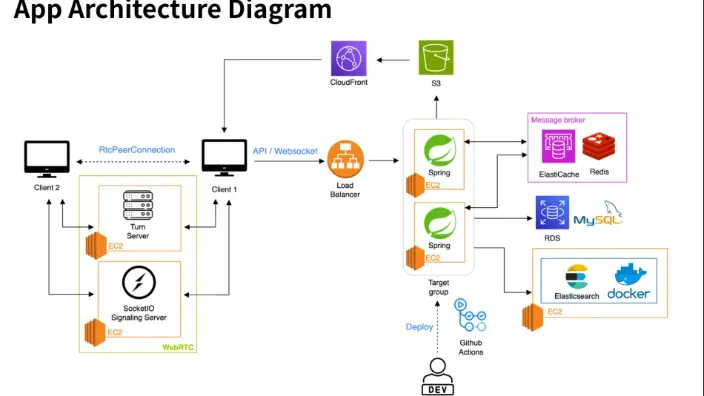
Clients talk to the backend over a normal API/WebSocket connection through an AWS Application Load Balancer, which fans requests out across two Spring Boot instances on EC2. For video/audio, clients instead open a direct RTCPeerConnection to each other (mesh topology), with a Socket.IO signaling server handling offer/answer/ICE exchange and a self-hosted Coturn TURN server relaying media when a direct peer connection isn’t possible (most home/office NATs).
A few decisions worth calling out:
- Redis as the message broker, not just a cache. Once there’s more than one Spring Boot instance behind the load balancer, a message sent by a client connected to instance A needs to reach a recipient connected to instance B. ElastiCache Redis pub/sub is what bridges that gap — each instance subscribes to the relevant channels and republishes incoming messages to its own WebSocket clients.
- Elasticsearch for search, not the system of record. Message search needed to stay fast even as history grew, so messages get indexed into Elasticsearch (running in Docker) specifically for search, separate from the primary datastore.
- JWT for auth across both the REST API and the WebSocket handshake, so a single token model covers messaging, channel management, and call signaling.
- Mesh over SFU for video. A mesh topology (every participant connects directly to every other participant) is simpler to build than a Selective Forwarding Unit, at the cost of not scaling well past small group calls — a reasonable tradeoff for a 5-week solo project, and the first thing I’d swap out if TeamSparks needed to support larger rooms.
Deployment
GitHub Actions builds and ships on every push, so the EC2 instances behind the ALB stay current without a manual deploy step.
What I’d do differently
The mesh WebRTC approach is the clearest ceiling on this project — it works well for small calls but degrades fast as participant count grows, since each client has to maintain a direct connection (and upload stream) to every other participant. A follow-up version would move to an SFU (e.g. mediasoup or LiveKit) so the server fans out media instead of the client.
← 返回專案列表